

Markdown Mirror for WooCommerce is a free plugin that serves a read-only Markdown copy of each WooCommerce product page at the product URL plus a .md suffix, so an agent that prefers token-light text reads the same facts your product page shows. It is the reference implementation of this site's product markdown mirror blueprint: the format the blueprint specifies, shipped as installable code you can read and audit.
Key takeaways
- It serves a distinct .md URL beside every product page (for example /product/ceramic-dripper.md), carrying the same identifiers, specs, price, and availability the HTML page shows, ordered so the decision-relevant facts come first.
- The mirror can never contradict the page. There is no agent-only content setting, so a mirror cannot say something a shopper does not see.
- It is read-only and makes no remote requests: no telemetry, no analytics, no store writes. Mirrors are virtual URLs, generated on request and cached.
- Ship it because it is cheap and standards-shaped, not because it is a proven ranking lever: no shopping agent documents fetching product Markdown today.
Get the plugin
Markdown Mirror for WooCommerce is free, published by AgentMint under the GPLv2 or later license, and listed in the WordPress.org plugin directory.
Get Markdown Mirror for WooCommerce (opens in new tab)The quickest way to install it is from your own dashboard: go to Plugins, Add New, search for "Markdown Mirror for WooCommerce", then install and activate. Source code, the commit history, and the issue tracker live in the GitHub repository(opens in new tab).
What each mirror contains
Each product mirror leads with the facts an agent selects on and omits any section with no data rather than padding it. A mirror can carry:
- Identifiers: GTIN (WooCommerce's core field), SKU, and brand.
- Classification: categories as hierarchical paths and tags, each linked to its archive or to its own
.mdmirror when taxonomy mirrors are on. - Specifications: visible attributes, weight, and dimensions.
- Price with currency, sale end dates, and your store's tax display.
- Availability using your store's own stock display, with a line per variation on variable products.
- Reviews: the real average rating and review count, shown only when reviews exist.
- Images: the main and gallery image URLs with their alt text.
- The short and full product descriptions as plain text.
Every mirror ends with a canonical link back to the product page and the product's real last-updated date. Sections with no data are omitted automatically, never invented.
Discovery, canonical headers, and caching
So agents can find the mirror, each product page gains exactly one rel="alternate" link tag pointing at its .md URL. The plugin adds no other markup and changes no titles or canonicals. Every mirror sends a canonical Link header pointing back at the HTML page and an X-Robots-Tag: noindex header, so the mirror never competes with your product page in search. Mirrors are cached with a short TTL and refreshed by invalidation hooks when a product changes, so a mirror does not drift out of step with the live page.
Taxonomy mirrors
Product categories, brands, and tags get .md mirrors of their archive pages too, each behind its own toggle. A category mirror carries the term name and description, its subcategories with their own mirror links, and its product list paginated at 100 per page (/page/2.md, /page/3.md, and so on), with the previous and next links stated in the document and an honest 404 past the last page. Category paths stay hierarchical, so /product-category/clothing/shirts.md reads as a path. Term mirrors follow the same archive visibility rules as the archive page, so catalog-hidden products stay out.
What you control
Everything is on by default. Under WooCommerce, Settings, Products, Markdown mirrors you can switch off any product mirror section (identifiers, classification, specifications, price, availability, variants, reviews, images, and the short and full descriptions) and any taxonomy group. Turning a section off only omits it; nothing turns a mirror into content your page does not carry.
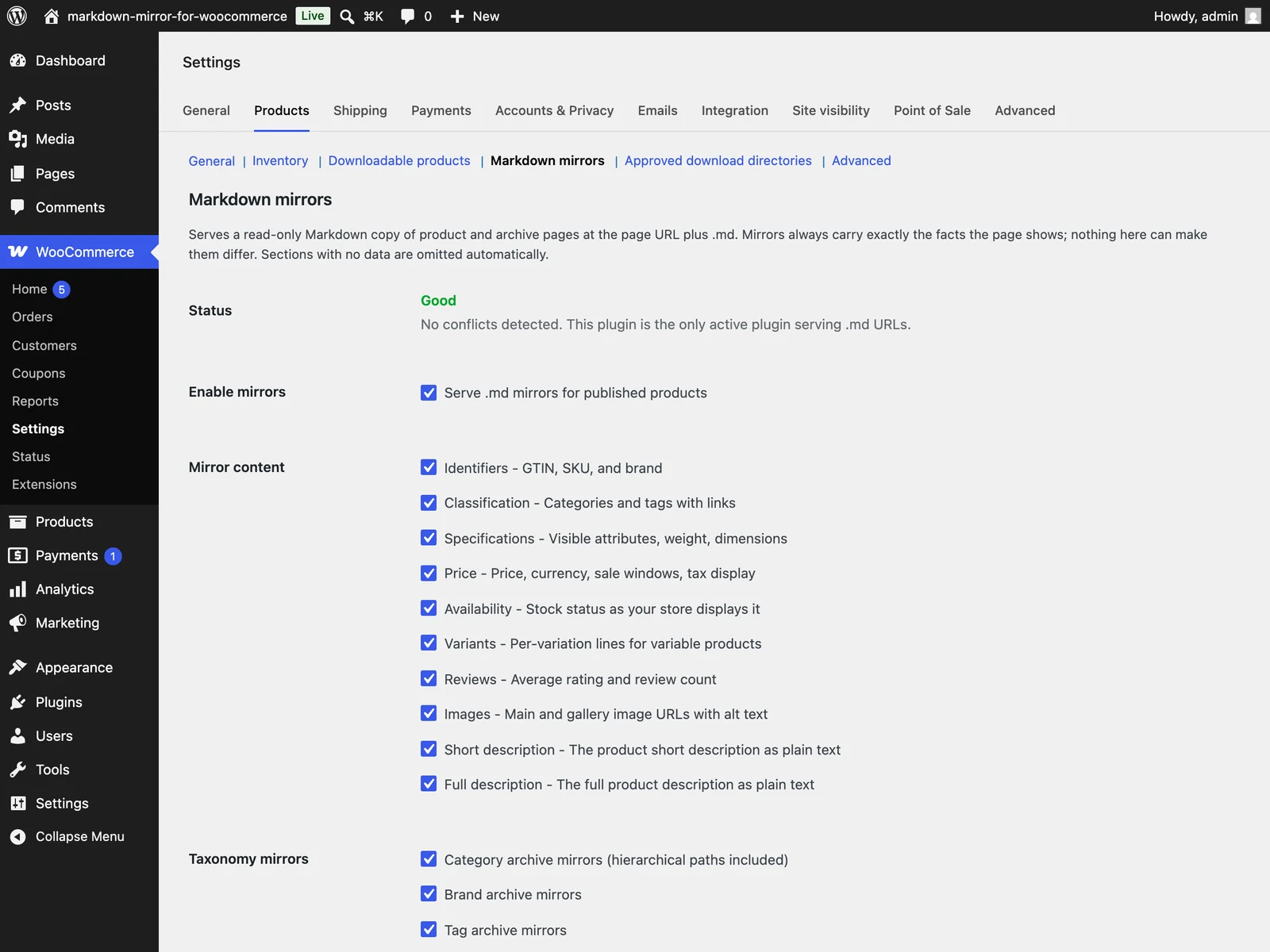
The plugin's settings screen under WooCommerce, Settings, Products, Markdown mirrors, captured in a demo store.
The same screen carries a Status row that reports conflicts: if another active plugin also serves .md URLs, the row names it and explains why to keep only one. The plugin raises no admin notices. When you uninstall, everything it stored is removed (settings, cached mirrors, and term cache versions, across every site of a multisite network), and nothing else is touched.
Scope and boundaries
What it does
It generates and serves a plain-Markdown copy of each product and taxonomy page from data your store already holds, orders it so identifiers and specifications come first, and makes each mirror discoverable and cacheable like any other URL. It reads your catalog; it does not add to it.
What it never does
- It never writes to your products, your theme, or your database content. Mirrors are virtual URLs, generated on request and cached.
- It never sends anything anywhere. There is no telemetry, no analytics, and no remote requests: everything is generated inside your site and served from your site.
- It never lets the mirror say something your page does not. There is no agent-only content setting, on purpose. Serving agents different content than shoppers is cloaking, and the plugin makes that structurally impossible, because the mirror always reflects the same product data your shoppers see.
The honest boundary
Ship the mirror because it is cheap to serve and standards-shaped, not because it is proven to win selection. We have found no verified public source showing that a shopping agent (ChatGPT Shopping, Perplexity, or Gemini) fetches a Markdown representation of a product page. Treat product Markdown as proven for documentation and coding agents and unverified for shopping agents, and do not attribute a selection outcome to the mirror.Hypothesis (our analysis) The blueprint's honest boundary carries the fuller, sourced version of this argument.
Requirements
- WordPress 6.5 or newer
- WooCommerce 9.2 or newer
- PHP 7.4 or newer
- Pretty permalinks (Settings, Permalinks, anything except Plain), which the
.mdURLs need
Where this fits
The product markdown mirror blueprint documents the format itself and the reasoning behind the section order. For the infrastructure around it, serving agent traffic without breaking your origin covers caching these surfaces, and information density for agents covers packing them with verifiable facts and staying on the right side of cloaking. To place a mirror in the wider readiness picture, work through the agentic readiness checklist and the agent selection checklist.